
BODY FAT SCALE MM 10672 - Body Composition Scale MEDION - Free user manual and instructions
Find the device manual for free BODY FAT SCALE MM 10672 MEDION in PDF.


| Product type | Body composition scale (impedance meter) |
| Brand | MEDION |
| Model | BODY FAT SCALE MM 10672 |
| Power supply | 2 CR2032 button cell batteries (3V) |
| Maximum weight | 150 kg / 330 lb |
| Measurement units | kg, lb |
| User memories | 12 slots |
| Main functions | Weight, body fat percentage measurement, body water percentage measurement |
| Fat measurement range | 3% to 50% |
| Water measurement range | 25% to 75% |
| User age | 6 to 100 years |
| User height | 80 to 220 cm |
| Athlete mode | Yes (for ages 15-50 years) |
| Child mode | Automatic if age < 12 years |
| Display | LCD screen |
| Platform material | Glass surface with metal electrodes |
| Operating temperature | 10°C to 35°C |
| Auto-off | Yes, after approximately 10 seconds of inactivity |
| Care and cleaning | Clean with a soft cloth and mild soapy water or glass cleaner. Avoid solvents and chemicals. |
| Safety | Do not use by pregnant women, pacemaker wearers, persons with fever, edema or dehydration. Keep out of reach of children (batteries). |
| General information | The scale uses the principle of bioelectrical impedance to calculate body composition. Do not attempt to repair yourself. |
Frequently Asked Questions - BODY FAT SCALE MM 10672 MEDION
User questions about BODY FAT SCALE MM 10672 MEDION
0 question about this device. Answer the ones you know or ask your own.
Ask a new question about this device
Download the instructions for your Body Composition Scale in PDF format for free! Find your manual BODY FAT SCALE MM 10672 - MEDION and take your electronic device back in hand. On this page are published all the documents necessary for the use of your device. BODY FAT SCALE MM 10672 by MEDION.
USER MANUAL BODY FAT SCALE MM 10672 MEDION
Safety instructions 4
Operation 6
Exchanging batteries 6
The messages in the display 7
Measuring weight 7
Saving personal data 8
Measuring body fat and water 11
Notes on body fat and water 12
Errors 13
Technical data 13

MD 10672
GB-3

SAFETY INSTRUCTIONS

About these instructions
Read these instructions carefully before using the scales. Note the warnings on the device and in the operating instructions.
Always keep the operating instructions close to hand. If you sell the equipment or give it away, make sure you also hand over these instructions and the guarantee card.
Keep battery operated equipment out of reach of children
Do not allow children to use the device without supervision.
The device is battery-operated. Batteries may endanger life if swallowed. For these reasons, keep the device out of reach of children. If a battery is swallowed, please obtain immediate medical assistance.
General information
Place the scales on a flat surface.
- Do not store the scales in a vertical position.
- Do not put weights on the scales unless you are measuring them and do not store items on it.
- Protect the scales from moisture.
- Do not stand on the scales when your feet or body are wet. Stand in the centre of the weighing area. Your feet must be placed on the metal measuring points for the scales to measure body fat and water.
□ Do not continue using the device if it or the glass area is damaged as you could injure yourself.
□ If the scales are not going to be used for long periods, remove the batteries.
GB-4



Measuring body fat
The following people should not use the body fat and water measurement:
Pregnant women
Those who have pacemakers fitted
Those who are suffering from fever
□ People with swollen legs or oedema
□ People who are heavily hydrated or dehydrated
Body fat measurement is not to be used for children under six.
Never undertake your own repairs
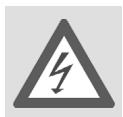
Never try to open and/or repair the device yourself. If there is a defect contact our Service Centre or other suitable specialist workshop.
Cleaning the device
For cleaning only use mild soap solutions or commercial glass cleaners. Avoid the use of chemical solutions and cleaning products because these may damage the device's surface and/or markings.

MD 10672
GB-5

OPERATION
Functional Characteristics
The body fat scales display the ratio of body fat and water to total body weight. The base of the scales have electrodes to measure body fat by means of the body's electric resistance. Lean body tissue has a lower resistance than fat body tissue. The integrated computer relates the body fat measured to the person's body height, age, sex and total weight. This results in the body fat value.
Exchanging batteries
The scales are supplied with two CR 2032 batteries.

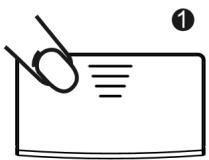
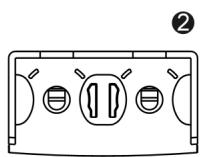
Before using the device for the first time, you must remove the plastic insulators from the battery compartment. To do so open the battery compartment and pull the two insulators from under the batteries using the little tabs.
To exchange the batteries, push the battery compartment cover on the base of the device in the direction shown by the arrow and flip it open.
Remove the used batteries.
As shown by the diagram in the battery compartment, insert the two button batteries with the plus pole (engraved side) pointing up:
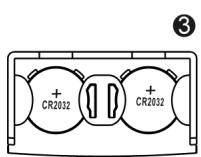
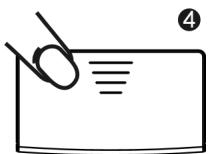
If the screen shows "LO" or the display's intensity falls the batteries must be replaced.
GB-6



OPERATION
The messages in the display
There follows a list of all the messages that the screen can display:
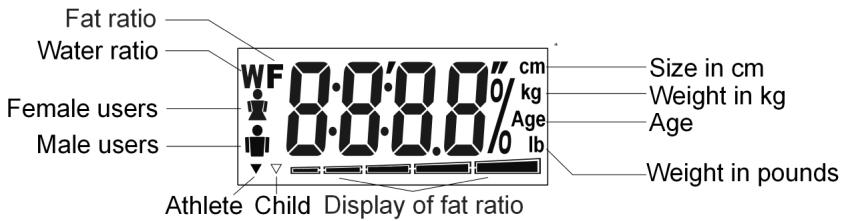

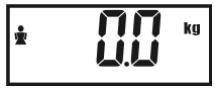
The scales are in measuring mode if the screen displays "0.0".
Measuring weight
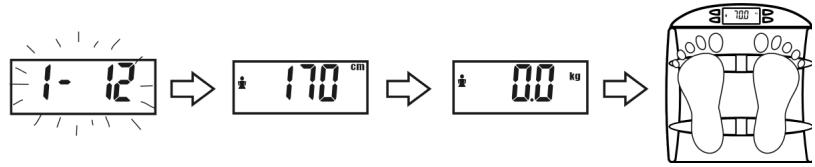
Press ON/OFF. The screen displays "HI" briefly and then "1-12" flashes.
Press ON/OFF again while "1-12" is flashing (if you do not press ON/OFF again the weight is also displayed but the scales also try to measure the body fat and water with the currently selected data).
Wait until the screen displays "0.0".
□ If you want to change the measurement from the default kg to lb first press the SET button (refer to "Other functions" on page 10).
- Stand in the centre of the scales. After a few seconds the screen indicates your weight in kg.
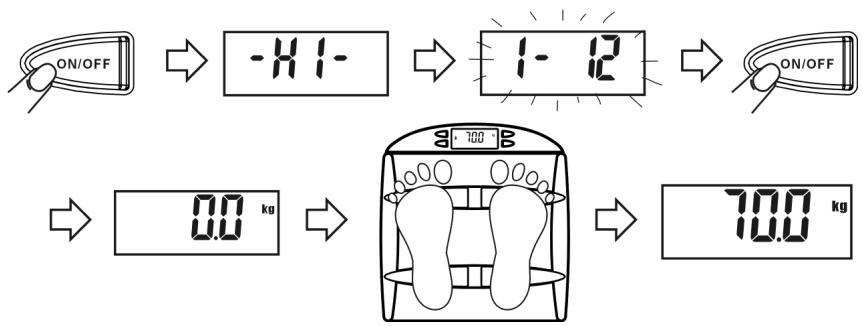
Press ON/OFF to switch the scales off.

OPERATION

If the scales do not register weight for around 10 seconds it switches itself off automatically.
Saving personal data
The scales interpret your body fat and water values on the basis of your personal data. Therefore you have to enter your personal data before measuring your body fat and water. Twelve memory spaces are provided for this.
The personal data is: weight unit kg or lb, sex, height, age and the athlete mode.
You enter your personal data as follows:
Press ON/OFF. The screen displays"HI" briefly and then "1-12" flashes.

- When "1-12" is flashing press the SET button. The most recently selected memory location is displayed (the first time the device is used: 1).
Use the or buttons to select the desired memory space and confirm by pressing SET.

The display now switches to the weight unit.
Use the or buttons to select the weight unit (kg or lb) and confirm by pressing SET.
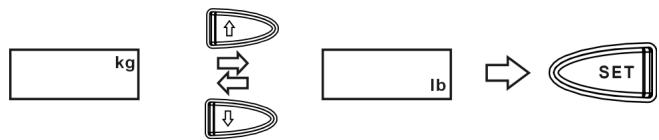
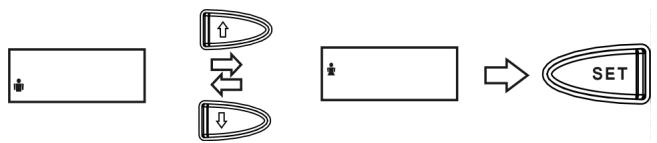
The display now moves to the symbols for "male" and "female".
OPERATION
Use the or buttons to select the sex and confirm by pressing SET.
GB
The display now switches to height.
Use the or buttons to select the height and confirm by pressing SET.
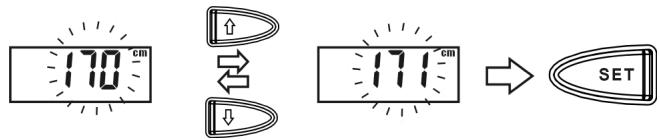
The display now switches to age.
Use the or buttons to select the desired age and confirm by pressing SET.
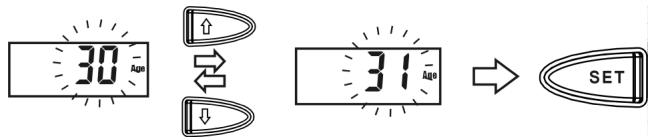
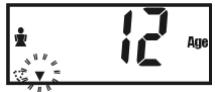
If you enter an age under 12 the screen changes for both measurement and display from adult to child mode.
Display "0.0"
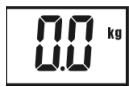
When you have entered your personal data, the display flashes "1- 12" three to five times and the height and sex of the most recently entered personal data are shown. Then "0.0" is displayed. Now the measurement can be made.

OPERATION
But at this point you can also enter the athlete mode .
Other functions
After entering the personal data "0.0" is displayed.
At this point you can set the athlete mode and change the weight unit again.
□ Selecting athlete mode: When the screen displays "0.0" press the button;
- Changing the weight unit: When the screen display "0.0" press the SET button to choose between kg or lb.
Now the measurement can be made.
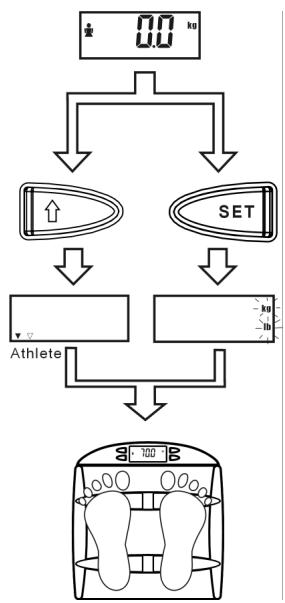

You must enter an age between "15 - 50" before being able to select the athlete mode.
* Athlete mode
Your scales have a special setting for well trained and muscular people ("athes"). As muscle cells have a similar bio-electric resistance to fat cells the scales could interpret muscles as fat. This problem only occurs if the muscle mass is large; if a person has a normal range of muscles the scales do not measure this as fat.
The athlete mode prevents this incorrect interpretation. In this mode the actual body fat values are measured using a different mathematical formula.
Measuring body fat and water
Important notes on correct measurement
To measure body fat and water you have to stand barefoot on the metal areas on the scales where the electrodes are located. Your feet must be dry and not moisturised.
Stand on the scales with straight legs and without bending your knees; ensure that your knees do not touch each other.
Measuring
Press ON/OFF. The screen displays"HI" briefly and then "1-12" flashes.
Select the desired memory space whilst "1-12" is flashing. It flashes three times in quick succession. Then the settings for this memory space are shown briefly in succession.
Stand on the scales when the screen displays "0.0".
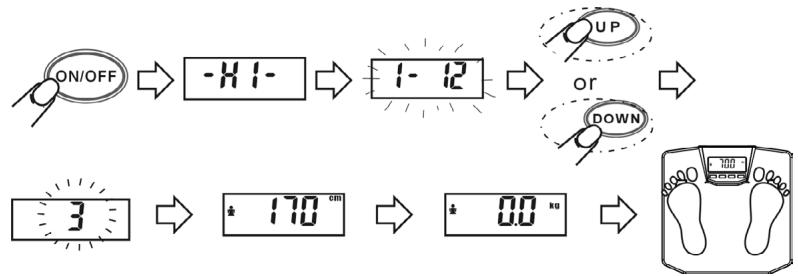
The following are displayed on the screen in quick succession:
Weight
Body fat and water measured
Percentage of body fat
Percentage of body water
Then the scales switch themselves off automatically.
OPERATION
Notes on body fat and water
Body fat
Your body fat ratio can vary from day to day and depending on the time of day.
Percentage ratio of body fat to total weight:
| FEMALE | MALE | ||||||||
| Age | Low fat ratio | Normal fat ratio | High fat ratio | Very high fat ratio | Age | Low fat ratio | Normal fat ratio | High fat ratio | Very high fat ratio |
| 6 - 12 | < 7 | 7-19 | 19-25 | > 25 | 6-12 | < 7 | 7-18 | 18-25 | > 25 |
| 13-19 | < 20 | 20-31 | 31-37 | > 37 | 13-19 | < 8 | 8-19 | 19-25 | > 25 |
| 20-39 | < 21 | 21-32 | 32-38 | > 38 | 20-39 | < 9 | 9-20 | 20-26 | > 26 |
| 40-59 | < 23 | 23-34 | 34-40 | > 40 | 40-59 | < 11 | 11-22 | 22-28 | > 28 |
| 60-79 | < 25 | 25-36 | 36-42 | > 42 | 60-79 | < 13 | 13-24 | 24-30 | > 30 |
| Athlete | 12-25 | Athlete | 3-15 | ||||||
Body water
Our bodies are primarily made up of water. The correct ratio of water is essential for the complete metabolic process, for healthy skin and to eliminate harmful substances (via sweat and urine).
A 5% loss of water can reduce body energy by 20 - 30% . Drink at least 2 litres of liquid every day.
Normal percentage of body water:
| FEMALEMALE | ||
| Child | 58-70 | 60-73 |
| Adult | 42-61 | 46-66 |
| Athlete | 56-71 | 60-73 |
In general sportspeople have 5% more body water.
As age increases the water ratio falls by around 10% .
ERRORS
| B-LD | Lo | Err |
| The maximum weight (150 kg) has been exceeded. | The batteries are almost empty and should be changed. | Incorrect measurement. Repeat the measurement. Ensure that you stand securely. When measuring body fat and water, stand barefoot on the scales. |
TECHNICAL DATA
Batteries: 2 × 3V , CR 2032
Max. weight: 150 kg/330 lb
Measurable fat ratio: 3 - 50%
Measurable water ratio: 25 - 75%
Age range: 6-100 years
Height range: 80 - 220 cm
Operational temperature: 10 - 35^
Subject to technical changes.

MD 10672
GB-13


TABLE DES MATIÈRES
A Anything is possible.
A good way to do this is to make it easier for people to understand the meaning of a word.